Uncategorized
week 10 code – AR + Warping
week9 colorCV fix
whoops, there was a bug in the cv example from last class, here’s the fixed code
week9Fixed
Homework 9
Homework:
implement tracking in the color example, and then use it with one of the prompts from the last two assignments that you haven’t explored yet – or – one of your own ideas.
Homework 8
– make a meaningful CV project that is designed for a friend or enemy, give them the program
– make a meaningful CV project that is designed for lonely people
– make a meaningful CV project that functions as a performative creative tool, writing, musical, etc.
or choose one of the three from last week that you haven’t done yet:
– make a meaningful CV project that runs while you’re sleeping
– make a meaningful CV project that runs in a public space but the only output is sound
– make a meaningful CV project that generates a poster
Homework 7 + cv intro code
For this week, choose one of these three options and use your newfound openCV skills to make it
– make a meaningful CV project that runs while you’re sleeping
– make a meaningful CV project that runs in a public space but the only output is sound
– make a meaningful CV project that generates a poster
Homework 6
in groups of no more than 4, implement 4-connectivity and then 8-connectivity connected component searching according to the algorithm described in class. I recommend building a way to show these pixel groups with colors in an image so you can debug your tests.
after you have 8-connectivity working implement contour extraction on those groups according to the chain coding algorithm we discussed in class. Draw the group contours over the images and label the groups.
although all of the below images must accurately be detected by your code, each has some particular strengths.
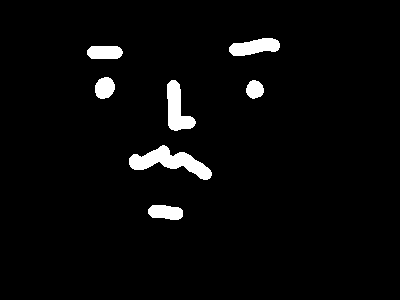
this image is good as a first test to see if your 4 connectivity is working
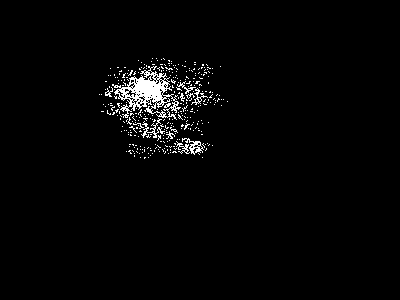
this image is good for stress testing any connectivity type for maximum number of groups and success. this is probably the hardest image to detect accurately, so if your algorithm works with it it probably works
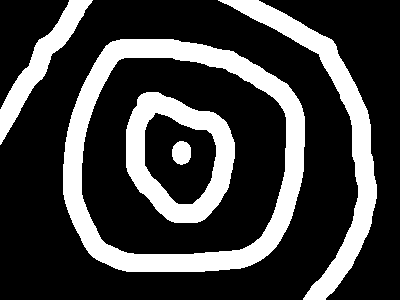
this image is a good second test for 4-connectivity
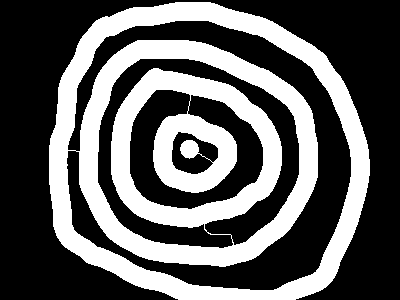
this image is good for testing 8-connectivity vs. 4-connectivty. the image will appear as a few groups in 4 connectivity, but a single group in 8.
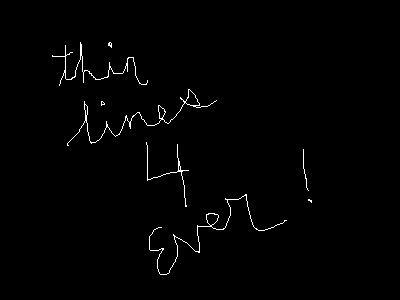
this image is good for testing 8-connectivity
Algorithm basics:
– 4-connectivity –
go through the pixels from left to right, top to bottom.
For each pixel that is white:
Check the Northern Neighbor, if it’s white and in a group, make that group my group.
Check the Western Neighbor, if it’s white and in a group and i am NOT in a group, make that group my group. If it’s white and in a group and i am in a different group, push a pair.
If I am still not in a group, then set my group to a new group.
go through the pixels a second time. If my pixel is in a group, check to see if it’s the match in any pairs, and if it is, change it’s group to the base of that pair.
one thing that may help in storing pairs is knowing how to use structs. structs are like miniature classes that can have data but no functions. For example, we could declare a class to store pairs like this:
struct Pair{
int base;
int match;
};
it’s important to put that ABOVE your testApp class in testApp.h but BELOW the includes. You could then use it in any way you want:
Pair p;
p.match = 5;
or even make a vector of pairs: vector<Pair> pairs;
– 8-connectivity –
same as above, but should accommodate diagonal connections
– contour extraction (chain coding) –
go through your image and for each new group you find, walk the perimeter. If you imagine a compass where N is 0 and the counts continue around e.g. NE is 1, E is 2 ….. NW is 7, you can easily store the direction you have most recently moved. Your last moved direction + 4 is the direction to the previous pixel, +5 is the pixel tangent to your last pixel, and +6 is your first unknown pixel. If you manage to traverse all 8 directions per pixel, then you have only a single pixel in your blob and your algorithm should account for that. If you manage to have your first and last pixel in your contour be equal, then you have finished your pixel walk and your contour is complete.
Homework 5
a) implement these kernel filters for an image programmatically:
(multiply all 9 pixels by these values, add them up. divide by weight. set value of [me] pixel)
also important: make sure the value you’re setting [me] pixel to is between 0 and 255, if it isn’t adjust it. one easy way to do this is value = ofClamp(value, 0, 255);
sharpen:
-1,-1,-1,
-1,9,-1,
-1,-1,-1
weight 1
gaussian:
1,2,1,
2,4,2,
1,2,1
weight: 16
prewitt (edge):
1,1,1
0,0,0
-1,-1,-1
weight 0
b) median filtering
Given the pixel + neighbors routine do the following:
for every pixel in an image, put it and it’s 8 neighbors in a temporary array of 9 elements, that you sort with qsort. then take the middle most element (the median) and use that as the new value
try doing both gaussian blur (1,2,1 / 2,4,2 / 1,2,1 kernel) and median filtering on a noisy image, at least once but perhaps multiple times. Which is better at fixing or removing points of noise?
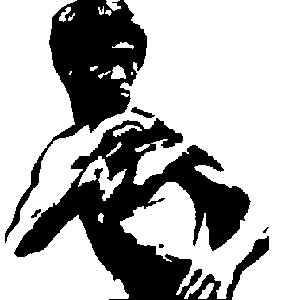
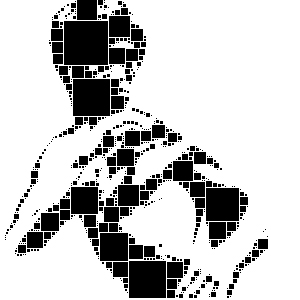
c) (advanced, optional, this is for the hardcore folks!). Try doing this both with squares and circles. First threshold an image. Then, find the largest square (or circle in the image). It can be white or black. Record it, then turn invert just those pixels and try to find the next larget box. here’s an input and result (via squares). when you draw the outcome, you can draw it just a bit smaller then the actual found square so it’s possible to see them.
input image:
result after square finding:
code for conway’s game of life
Homework 4
Click to download Code for Week 4
homework for week 4:
-> modify the sorting algorithm in sorting_02 to sort by row from left to right
result should look like this:

-> implement erosion on the snoopy image in the dilation example
-> implement conway’s game of life
-> make an awesome poster based off interpreting an image in any way with codeand output it as a postScript file.
-> make sure you understand everything up to now