Homework 6
in groups of no more than 4, implement 4-connectivity and then 8-connectivity connected component searching according to the algorithm described in class. I recommend building a way to show these pixel groups with colors in an image so you can debug your tests.
after you have 8-connectivity working implement contour extraction on those groups according to the chain coding algorithm we discussed in class. Draw the group contours over the images and label the groups.
although all of the below images must accurately be detected by your code, each has some particular strengths.

this image is good as a first test to see if your 4 connectivity is working

this image is good for stress testing any connectivity type for maximum number of groups and success. this is probably the hardest image to detect accurately, so if your algorithm works with it it probably works

this image is a good second test for 4-connectivity
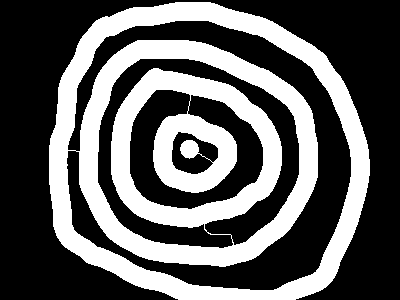
this image is good for testing 8-connectivity vs. 4-connectivty. the image will appear as a few groups in 4 connectivity, but a single group in 8.

this image is good for testing 8-connectivity
Algorithm basics:
– 4-connectivity –
go through the pixels from left to right, top to bottom.
For each pixel that is white:
Check the Northern Neighbor, if it’s white and in a group, make that group my group.
Check the Western Neighbor, if it’s white and in a group and i am NOT in a group, make that group my group. If it’s white and in a group and i am in a different group, push a pair.
If I am still not in a group, then set my group to a new group.
go through the pixels a second time. If my pixel is in a group, check to see if it’s the match in any pairs, and if it is, change it’s group to the base of that pair.
one thing that may help in storing pairs is knowing how to use structs. structs are like miniature classes that can have data but no functions. For example, we could declare a class to store pairs like this:
struct Pair{
int base;
int match;
};
it’s important to put that ABOVE your testApp class in testApp.h but BELOW the includes. You could then use it in any way you want:
Pair p;
p.match = 5;
or even make a vector of pairs: vector<Pair> pairs;
– 8-connectivity –
same as above, but should accommodate diagonal connections
– contour extraction (chain coding) –
go through your image and for each new group you find, walk the perimeter. If you imagine a compass where N is 0 and the counts continue around e.g. NE is 1, E is 2 ….. NW is 7, you can easily store the direction you have most recently moved. Your last moved direction + 4 is the direction to the previous pixel, +5 is the pixel tangent to your last pixel, and +6 is your first unknown pixel. If you manage to traverse all 8 directions per pixel, then you have only a single pixel in your blob and your algorithm should account for that. If you manage to have your first and last pixel in your contour be equal, then you have finished your pixel walk and your contour is complete.